EN

For someone arriving at an unfamiliar airport, baggage claim is one of the last parts of the journey. After leaving the aircraft and passing through the arrival process, the immediate question is usually simple: which carousel has the luggage for this flight?
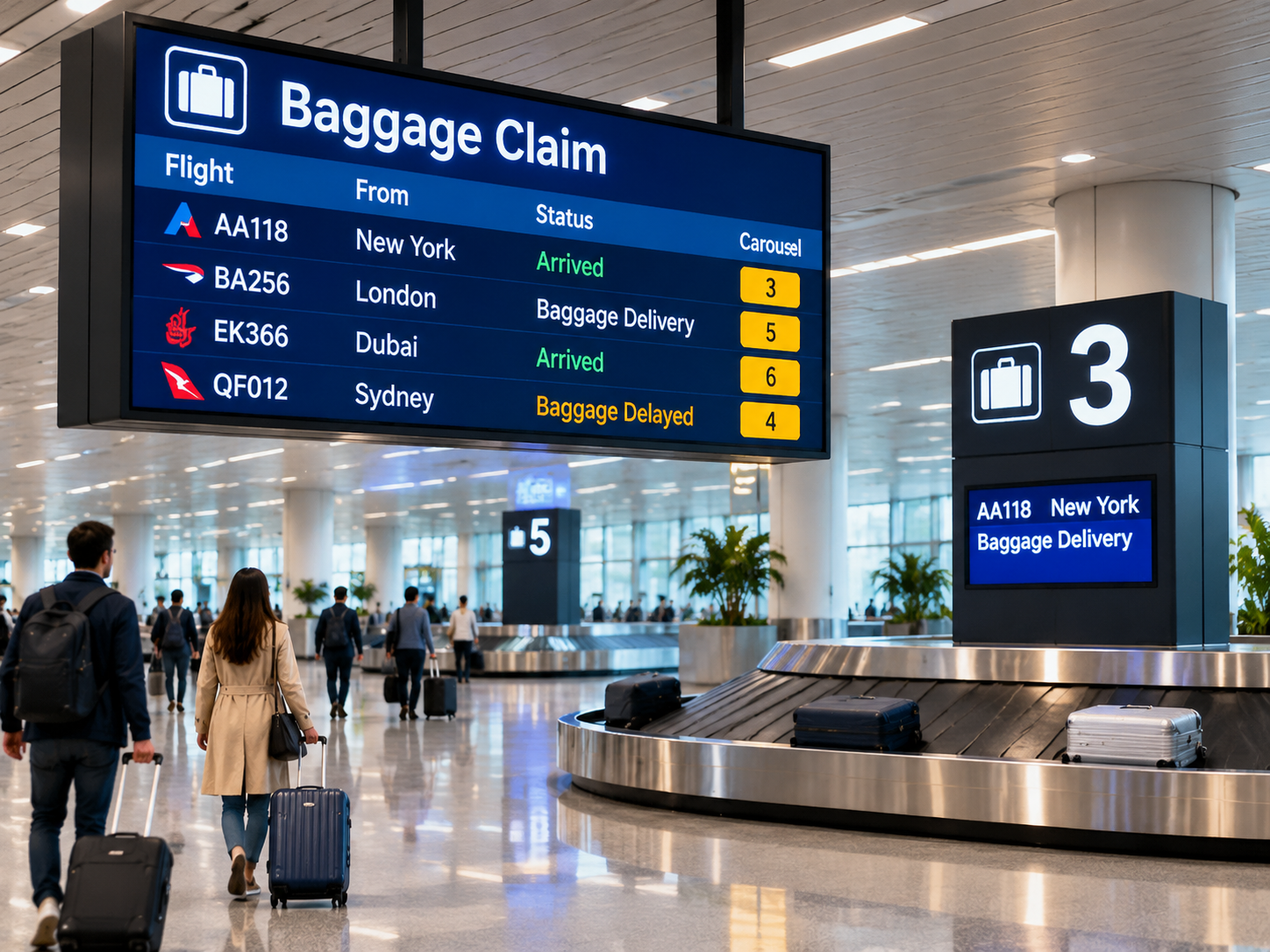
An airport baggage claim LED display answers that question by connecting flight information with the assigned baggage carousel. It also gives passengers a way to recognize a changed assignment or understand when baggage delivery has been delayed. The screen is most useful when the information appears at the right moment, rather than simply occupying a prominent position in the hall.
That makes the relationship between the entrance display, individual carousels and the airport's information systems more important than the screen count alone.
Map baggage-claim zones and passenger decision points
Imagine arriving passengers entering a baggage hall with eight carousels. They know their flight number, but the belts are spread across a wide room. If the first display only shows information directly above each conveyor, passengers may have to walk around the hall before finding the right one.
A better arrangement gives them the flight-to-carousel information near the entrance, then confirms it again at the relevant belt. The entrance display acts as a directory for recently arrived flights. A screen near the carousel has a narrower purpose: confirming which flight or flights are being handled there.
This distinction is reflected in the FAA's AC 150/5360-12F, Airport Signing and Graphics. Its guidance describes baggage information displays near primary baggage claim entrances and additional displays at individual baggage claim devices. It identifies airline, flight number, origin, arrival time, flight status and assigned claim device as relevant information.
The layout should also account for passengers who enter from different directions. In a large hall, a display that is easy to see from the main entrance may be hidden from a secondary entrance or a nearby arrival route. The best position is the one that gives passengers the information before they have to choose between different belts.
There is also little benefit in repeating every flight detail on every local screen. A broad overview can show several arrivals, while a carousel-side display can concentrate on the flight identifiers that matter at that location. This keeps the information useful without making the screen unnecessarily dense.
When multiple flights share one carousel, their identifiers should remain distinguishable. A passenger should not have to guess whether the first flight listed is the only one being handled. The same principle applies when the airport uses both an airline's operating flight number and a codeshare number.
Connect flight and carousel assignment information
The information shown on a baggage claim screen comes from airport operations, not from the LED panel itself. This distinction matters because a screen can present an assignment clearly while still showing the wrong carousel if its information source has not been updated.
Flight information and baggage handling information may come from different systems. The airport's flight information environment can provide the airline, flight number, origin and arrival status, while a baggage operations system may provide the carousel assignment and relevant delivery events. The exact arrangement depends on the airport's existing infrastructure.
For passengers, the most useful part is the connection between those records. Seeing a flight marked as landed does not tell someone where to collect their luggage. The carousel number completes that information and turns an arrival update into something passengers can act on.
Shared flights make the relationship slightly more complicated. Several services may use one belt, and codeshare flights may have different identifiers for the same arrival. The display should use flight references that passengers can recognize from their arrival information, rather than relying on an internal operational code that means little outside the airport.
Carousel reassignment is another situation where the information has to remain consistent. If a flight moves from Carousel 3 to Carousel 6, the overview needs to show the new assignment, and the old carousel display should no longer identify that flight as active. Otherwise, two screens can give passengers different instructions at the same time.
The airport's designated information source should control the assignment, with the display system receiving the approved update. Where staff can make manual corrections, the airport should establish how those changes are authorized and how they are reflected across the affected screens. This is an operational information decision, not simply a matter of changing the text on a panel.
Where the airport's authorised information source supports it, a visible last-updated time can help staff and passengers recognise whether a carousel assignment is current. The timestamp should follow the same approved data source rather than being entered independently on individual displays.
Once the data relationship is clear, the display requirements become easier to define. The airport's authorised information-system provider remains responsible for the flight and baggage data; a led display screen supplier can then assess the physical screen format, dimensions, pixel pitch and maintenance access needed to present that information clearly.
Separate routine carousel updates from delayed-baggage notices
Not every delay in the arrival process means the same thing. A flight may arrive late, but its baggage can also take longer to reach the carousel after landing. For someone waiting in the reclaim hall, these are two different situations with different implications.
A routine carousel update is relatively straightforward. It tells passengers where the luggage is being delivered and whether the process is underway. A baggage delay message, by contrast, explains that the expected delivery process has changed. The wording should make that distinction clear instead of displaying a general delay notice that could refer to the aircraft.
For example, a message such as “Baggage delivery delayed” tells passengers what is happening. If the carousel assignment has changed, “Updated carousel: 6” is more useful than simply replacing the old number without explaining the change.
The final stage also deserves clear treatment. FAA AC 150/5360-12F specifically discusses a “last bag” indication to show that all baggage has been unloaded. This is useful because passengers may otherwise continue waiting even after delivery is complete. The message should appear only when the airport's baggage operation has confirmed that state.
Estimated waiting times can be useful in some environments, but only when the source system can provide a dependable estimate. If no reliable time is available, a straightforward status update is less misleading than a countdown that changes without explanation.
The important distinction: Flight status describes the aircraft's arrival. Baggage status describes what is happening to the luggage. Keeping these two types of information separate makes updates easier to understand.
Visual treatment also matters. A changed carousel or delayed delivery notice should be easy to distinguish from ordinary flight information, but it does not need excessive flashing or animation. Consistent placement, readable text and a clear status label are often more useful in a busy baggage hall.
Plan screen placement for viewing distance and language needs
A display at the entrance and one beside a carousel are read in different circumstances. The first may be viewed from several metres away while passengers decide where to walk. The second is more likely to be read while people approach the conveyor or stand nearby waiting for luggage.
This changes the way screen dimensions and pixel pitch should be considered. An overview containing several flights needs enough space for the airline, flight number, origin and carousel assignment to remain distinguishable. A local display has fewer information fields and may be designed around a closer viewing position.
Pixel pitch is part of that decision, but smaller is not automatically better. Fine-pitch LED can help when passengers stand close to a screen containing detailed text. At longer viewing distances, the additional pixel density may offer little practical improvement if the layout and character size are already appropriate.
The airport's lighting and architecture also influence the result. Reflections, overhead structures, columns and crowded waiting areas can all affect whether passengers can read a screen from the positions that matter. A review from the actual approach routes is more useful than judging readability from a close-up product image.
For an enclosed baggage reclaim hall, an indoor LED display is the logical starting point. The final configuration should be assessed against the nearest passenger viewing position, the screen's mounting location, required text size and available maintenance access. A product's pixel pitch alone cannot establish whether it is suitable for the site.
Language requirements can change the layout just as much as screen dimensions. A flight origin that fits on one line in English may take considerably more space in another language. If several languages are displayed together, the screen needs enough room to keep the flight number and carousel assignment easy to identify.
Separate sections of FAA AC 150/5360-12F address viewing angles, character legibility and bilingual or multilingual messaging. These principles are useful when reviewing a baggage-claim display layout, although the guidance does not prescribe a specific LED pixel pitch for this application. For international reclaim halls, test representative translations before approving the final screen layout. Longer text should not push the flight identifier or carousel number out of immediate view.
Prepare the project brief for an airport display supplier
Once the passenger information and screen positions are understood, the hardware discussion becomes more focused. Instead of starting with a generic screen size, the airport can explain what each display needs to show and where passengers will be reading it.
A floor plan is the most useful starting point. It should show the carousel positions, passenger approach routes, proposed entrance and local screen locations, and any columns or structures that may obstruct sightlines. Approximate screen dimensions and viewing distances help turn the layout into a practical display proposal.
The operating brief should identify the number of carousels, whether flights share belts, the authorised source of flight and baggage information, and the languages and status messages passengers need to see. Representative message examples—such as a routine assignment, a delayed-baggage notice, a carousel change and a last-bag update—help assess text length and layout. Site photographs and the project country add useful context.
There is also a distinction between the display hardware and the airport's information infrastructure. The airport or appointed system integrator defines the source data and its update process. The LED supplier assesses the screen configuration, physical dimensions, control equipment and installation requirements. Discussing both sides early makes it easier to identify what can be specified immediately and what depends on the airport's existing systems.
For a project involving multiple screen positions, it may also be useful to review different configurations rather than assume that every display should use the same pixel pitch. The entrance overview and the carousel-side confirmation screen may have different viewing requirements, even though they present information from the same source.
Frequently Asked Questions
What information should an airport baggage claim LED display show?
Can baggage claim screens show a last-bag notification?
Does every baggage carousel need its own LED display?
How should airports choose the pixel pitch for baggage claim screens?
Discuss Your Airport Baggage Claim Display Project
Every baggage reclaim area has its own carousel arrangement, viewing conditions and information requirements. A project review can begin with the floor plan and the way flight and baggage updates are currently managed.
Share your floor plan, number of carousels, proposed screen positions, information source, language requirements and project country to request an initial project assessment.