EN
EN


In many LED video wall projects, the control system is only noticed when something feels wrong. The image may look slightly delayed, the wall may be difficult to map, or the same content may behave differently after one cabinet is replaced. Therefore, professional video wall suppliers should explain more than panel price and cabinet size. They should also explain how the processor, sending card, receiving card, calibration files, and operation workflow shape the final display experience.
This article compares Novastar and Brompton from a practical project angle. It does not treat the two names as a simple “standard vs premium” choice. Instead, it explains how each control workflow fits real applications, how to avoid overbuying features, and what should be confirmed before production.
The Common Control-System Mistake Appears After Installation
At first, a LED video wall project can look like a panel decision. Screen size is measured, pixel pitch is compared, brightness is discussed, and the quotation begins to move forward. However, the real experience appears later, when content enters the wall and the whole system must work in the actual venue.
For example, a retail wall may look bright in a factory test, yet feel uneven inside a store with glass windows and changing daylight. A meeting room wall may show a laptop clearly, but switching between sources may interrupt the rhythm of a presentation. In a rental event, one missing configuration file can slow down the installation team during a very tight setup window.
Therefore, the control system is not a small accessory. It decides whether the screen feels calm, stable, and easy to operate. It also decides whether a technician can solve problems quickly when a cabinet, card, cable, or processor setting needs attention.
In simple terms, the control decision should start before the screen is produced. If it starts too late, the wall may still show an image, but the daily operation can feel fragile.
Novastar vs Brompton Is a Workflow Question, Not Just a Brand Question
Novastar and Brompton are often compared as two control-system choices. However, the useful comparison is not about which name sounds more advanced. The better question is which workflow fits the pressure of the project.
Novastar is widely used because it offers a practical balance of stability, availability, and familiar operation. It can work well for fixed commercial displays, indoor advertising screens, showroom walls, church backgrounds, conference rooms, and many rental applications.
Brompton-level workflows usually enter the discussion when the image becomes production-critical. Broadcast studios, camera-facing stages, premium touring, and virtual production environments may need deeper color control, smoother camera behavior, and tighter show workflow.
Still, that does not mean every project should move upward. A premium workflow creates value only when the application can actually use it. Otherwise, the extra budget may be better used for better cabinets, spare modules, cleaner installation, stronger packaging, or more complete testing before delivery.
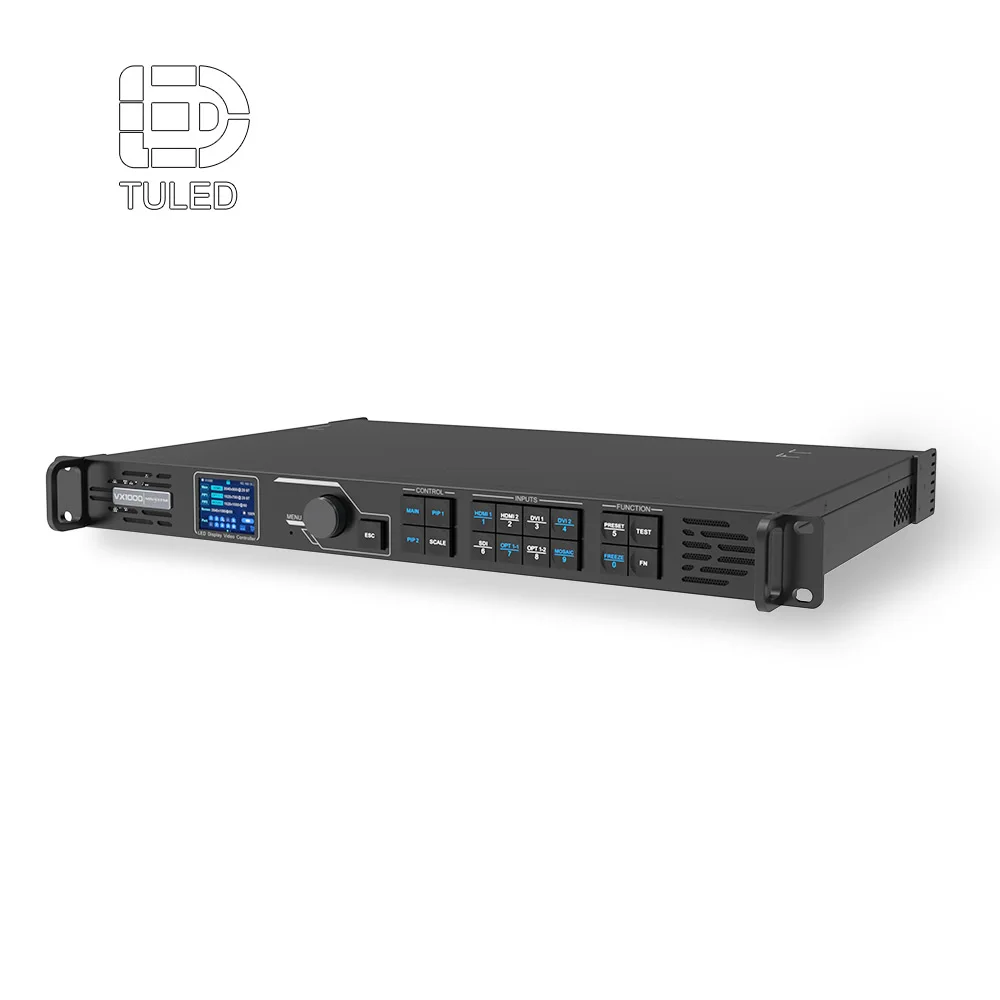 View Novastar VX1000 Video Processor
 A video processor shapes how sources enter, scale, switch, and reach the LED wall during real operation.
What Video Wall Suppliers Should Explain Before Quoting a Control System
A serious control-system discussion should make the signal path easy to understand. First, the processor handles the incoming video source. It may receive content from a laptop, camera switcher, media server, signage player, or control-room workstation.
Next, the sending card sends display data toward the LED screen system. This part affects loading capacity, signal routing, and screen mapping. In a small fixed screen, the setup may be simple. In a large rental wall, the sending plan can affect setup speed and backup safety.
Then, the receiving card inside the cabinet receives that data and controls how the modules display the image. This part matters when a cabinet needs service, a card needs replacement, or calibration files must be restored after maintenance.
Therefore, a proposal should not say only “controller included.” It should explain the processor model, sending route, receiving card match, software workflow, spare plan, and saved files after testing.
 View Novastar MSD300 Sending Card
 A sending card should be selected by screen size, resolution, cabinet quantity, and service plan, not by model name alone.
When Novastar Is Enough for a Project
In many projects, Novastar is enough because the real requirement is stable operation rather than complex production control. A retail display, lobby wall, school auditorium, shopping mall screen, showroom installation, or standard stage backdrop usually needs predictable playback, easy setup, and practical support.
For example, a store display may run product videos, seasonal campaigns, and short promotional loops. In that scene, the control system should support stable daily playback, simple brightness adjustment, and easy content updates. It does not need a broadcast-grade workflow unless cameras, strict color review, or complex live switching are involved.
Similarly, a corporate meeting room often needs clear laptop input, sharp presentation text, and smooth switching between sources. Therefore, the processor should be chosen around source habits. HDMI, DVI, SDI, or media player input matters only because it affects whether meetings feel smooth and whether the operator can work without stress.
For rental use, Novastar also fits many practical cases. Many technicians know the ecosystem, and spare parts are easier to plan. However, the system still needs proper labeling, saved files, and a clear backup method. Otherwise, a familiar control system can still become difficult on site.
So the judgement is not “Novastar is simple.” The real judgement is whether the project needs stable commercial performance, familiar operation, and service-friendly control. If that is the main goal, a well-planned Novastar solution can be the right choice.
When Brompton-Level Workflows Start to Matter
Brompton-level workflows usually become relevant when the LED wall is no longer only a display surface. Instead, it becomes part of a production image. This is common in broadcast sets, premium live events, touring stages, virtual production, and camera-facing environments.
In these projects, small image issues can become visible. A wall may look acceptable to the eye, yet show artifacts on camera. Color may seem close in the venue, yet fail a creative review when compared with the content monitor. Latency may feel minor during setup, yet become a problem when the wall must sync with cameras, lighting, audio, and media servers.
Therefore, the reason to consider a Brompton-level workflow is not prestige. It is risk control. If the LED wall must behave like part of a professional visual pipeline, deeper image control and workflow predictability can become valuable.
However, the decision should stay practical. A premium workflow cannot fix poor content planning, weak installation, bad cable routing, or unrealistic viewing distance. It works best when the entire project is planned as a system.
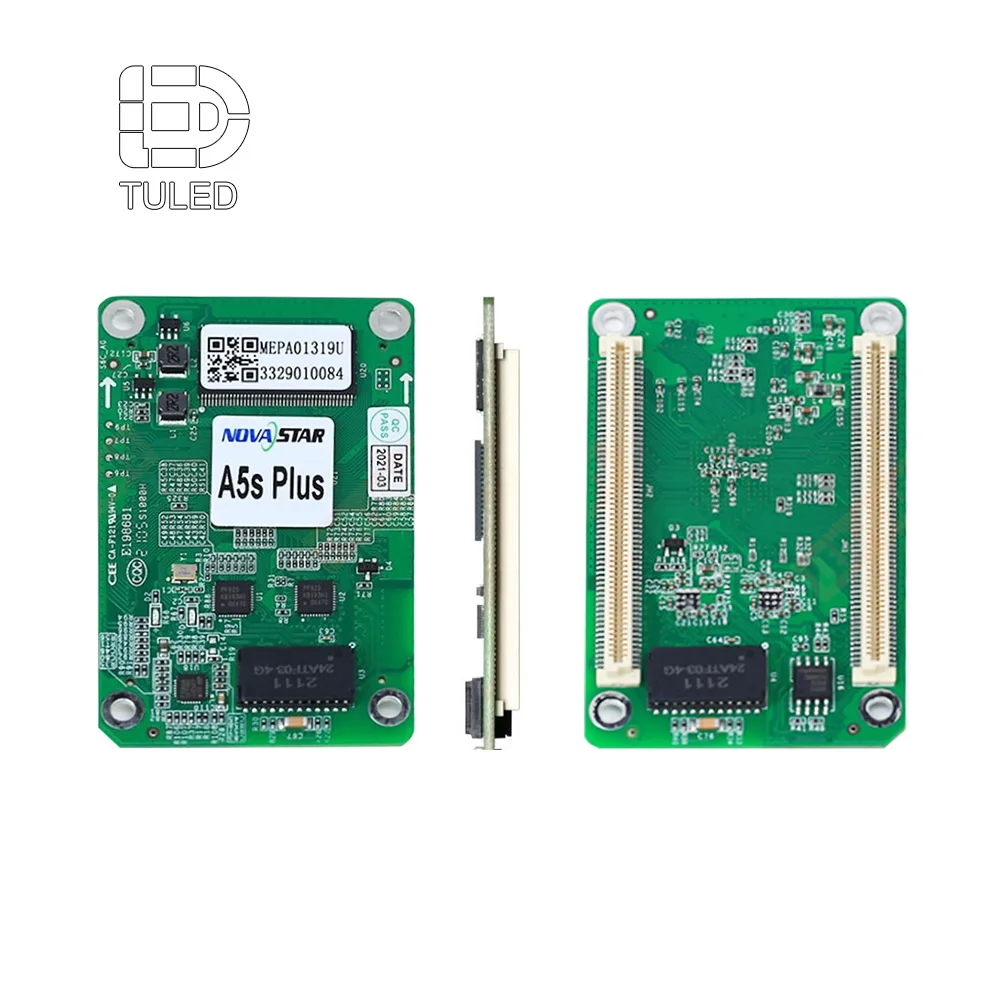 View Novastar A5s Plus Receiving Card
 Receiving cards matter most when a project needs fast service, consistent cabinet behavior, and reliable configuration recovery.
Scene-Based Judgement: Choose by Real Use, Not by a Parameter List
A control-system decision becomes easier when each scene is treated as a working environment. In a retail store, the display must feel attractive, reliable, and easy to update. In a church, the wall may need to support worship visuals, live camera shots, and volunteer operation.
In a rental event, time becomes the hidden cost. The crew may enter the venue in the morning and need the wall ready for rehearsal by afternoon. Therefore, the control system should support quick mapping, clear labeling, spare planning, and simple recovery when one cabinet behaves differently.
In a command center, the screen may run for long hours with dashboards, maps, alarms, and multi-window content. Here, the processor matters because it affects source handling, scaling, and operator comfort. The question is not only whether the wall can show a picture. The real question is whether people can read information without visual fatigue.
For broadcast or virtual production, the wall must satisfy both the eye and the camera. Refresh rate, grayscale, and calibration should never be dropped into a quotation as empty terms. Each term must connect to a result: smoother camera capture, cleaner low-brightness detail, and better color consistency under production conditions.
As a result, the best control choice is the one that matches the pressure of the scene. A simple signage wall should not be overcomplicated. A camera-critical stage should not be underplanned.
Decision Table: Which Control Workflow Fits the Project?
The table below is designed for selection logic, not parameter stacking. It connects each project type with the real business result and the right questions to ask before the system is locked.
| Project Scene | What the Scene Really Needs | Novastar Often Fits When | Brompton-Level Workflow May Matter When | Question to Confirm |
|---|---|---|---|---|
| Retail video wall | Clean brand visuals and easy content updates | Daily playback is stable and not camera-critical | Premium visuals need strict color approval | How will brightness and calibration be managed after opening? |
| Corporate wall | Clear presentation text and source switching | Laptops and media players are the main sources | Executive broadcast or studio recording is frequent | Which inputs will be used every week? |
| Rental stage | Fast setup, repeatable mapping, and spare control parts | The event workflow is common and technician familiarity matters | Touring shows need advanced color and camera confidence | Are configuration files and spare cards included? |
| Broadcast stage | Camera-friendly image behavior | The wall is only a simple background | The wall is captured closely and often | Will a camera test be done before shipment? |
| Control room | Long-hour readability and multi-source operation | Standard inputs and clear layouts are enough | Complex visualization and strict monitoring workflows exist | How will sources, windows, and scaling be handled? |
 Explore Video Wall Panels
 Panels and control workflow should be planned together, because the image surface and signal path decide the final viewing experience.
How the Control System Changes the Real Viewing Experience
A good LED wall should not make people think about the technology behind it. In a retail space, people should notice the product story. In a church, the congregation should follow worship content without distraction. In a control room, operators should read information clearly for hours.
However, when control planning is weak, the screen starts to call attention to itself. Source switching may feel awkward. Dark scenes may lose detail. A replaced cabinet may show a slightly different tone. A rental crew may spend too much time searching for the correct file.
This is why parameters need context. Refresh rate affects motion and camera comfort. It matters most for stages, broadcast, sports, and camera-facing walls. The useful question is not only “What is the refresh rate?” It is “Has the selected control workflow been tested with the camera and content type?”
Brightness affects visibility, but the business result is comfort and clarity. Outdoor displays need enough daylight performance. Indoor walls need balance because too much brightness can feel harsh. Therefore, the project should ask how brightness will be adjusted across day, night, and content scenes.
Cabinet design affects service speed and cable management. It matters most for rental walls, embedded installations, and long-term fixed projects. The useful question is whether the cabinet layout makes the control system easier to access and repair.
Practical Selection Logic for Retail, Corporate, Rental, and Broadcast Projects
Retail and Showroom Walls
For retail and showroom spaces, the screen must support brand atmosphere. The wall may show product launches, seasonal campaigns, lifestyle videos, or wayfinding content. Therefore, the control workflow should be simple enough for daily operation and stable enough for long hours.
In this scene, Novastar is often practical. The focus should be on content resolution, brightness adjustment, calibration consistency, and easy playback updates. If the store uses the wall for premium film shoots or brand events, then deeper workflow planning may be worth discussing.
Corporate and Meeting Room Walls
For meeting rooms, the wall must make information readable. Presentation slides, dashboards, video calls, and product demos need clean scaling. Therefore, the processor should match real input habits, not only the maximum specification.
A common mistake is choosing a screen first and asking about inputs later. Instead, the source list should be confirmed early. Laptops, conferencing systems, media players, and control-room computers may all require different handling.
Rental and Event Walls
For rental projects, the control system must protect time. Every minute saved during mapping, testing, and troubleshooting improves the event workflow. Therefore, the proposal should include spare receiving cards, labeled cables, saved configuration files, and clear setup notes.
Novastar may fit many event projects because technicians often know the system. However, larger shows with cameras and strict creative demands may need more detailed workflow review. The decision should follow the show pressure, not the brand name alone.
Broadcast and Camera-Facing Walls
For camera-facing walls, the control system must be judged through the camera. A wall may look smooth in person but show issues when filmed. Therefore, production teams should discuss scan behavior, brightness range, color control, and test workflow before the system is confirmed.
In this scene, Brompton-level workflows may become more relevant. Still, the entire system must support the goal. Good panels, accurate calibration, proper content preparation, and well-planned installation are still essential.
Experience-Based Selection Tips
First, match the control workflow to the person who will operate the screen. A complex workflow can become a burden if the daily team only needs scheduled playback. However, a simple workflow can become risky when live switching, camera capture, and creative approval are required.
Second, ask for the real signal path. The path should include source, processor, sending route, receiving cards, cabinet layout, software, and saved files. If the signal path cannot be explained clearly, the quotation is not ready.
Third, treat spare parts as part of the control system. Spare modules are important, but spare receiving cards, control cables, and configuration files can be just as important. This is especially true for rental and long-hour fixed installations.
Finally, request a test process that matches the real scene. A retail wall should be checked for daily brightness and content clarity. A camera-facing wall should be checked with camera conditions. A rental wall should be checked for mapping recovery and cable labeling.
What to Confirm Before Locking the Control System
Before an order is placed, the control system should be confirmed in plain working language. The goal is not to collect more technical words. The goal is to reduce uncertainty during installation and daily use.
- Confirm the final screen size, cabinet quantity, and total resolution before selecting the processor.
- Confirm all content sources, including laptop, media player, camera switcher, signage player, or control-room workstation.
- Confirm the sending card model, loading plan, and signal backup method.
- Confirm the receiving card model and whether spare cards can be configured quickly.
- Confirm whether calibration files, mapping files, and software versions will be saved after testing.
- Confirm whether the system will be tested with the real content type or camera scenario.
- Confirm who provides remote support during installation and first power-on.
These questions make quotation comparison easier. They also help separate a complete solution from a simple hardware list.
How Factory Support Makes Control-System Planning Easier
A control system is easier to plan when the display supplier understands both the screen structure and the signal workflow. If panel selection, cabinet layout, receiving card placement, power planning, and testing are handled separately, small gaps can appear.
For example, a factory-style team can check whether the selected control hardware matches the cabinet layout before production. It can also prepare wiring notes, test the control path, and save configuration files before delivery. This reduces pressure during installation.
Additionally, OEM/ODM support can help when the project needs a special cabinet size, mounting method, service direction, or accessory layout. The control system then becomes part of the whole solution, not a last-minute add-on.
For long-term projects, support also matters after the screen is installed. A 2-year warranty, 100% test before delivery, and 24/7 support are valuable only when the project files and system notes are clear enough for service teams to use.
How to Avoid Overbuying or Underbuying Control Features
Overbuying happens when a premium control workflow is selected without a matching operating need. The screen may work well, but the daily team may not use the advanced functions. As a result, the budget does not create enough visible value.
Underbuying happens when a project looks simple on paper but becomes demanding in the venue. A camera-facing wall, a high-pressure event, or a complex source environment may need deeper planning than the first quotation suggests.
The safest path is to define the real workflow first. How often will content change? Who operates the wall? Will cameras capture it? Is the screen fixed or rental? What happens if one cabinet is replaced? These questions reveal the real control requirement.
After that, the control brand becomes easier to judge. Novastar can be the right fit when practicality, stability, and familiar operation are the main goals. Brompton-level workflow can be considered when production quality, camera performance, and advanced visual control carry real weight.
A Practical Pre-Quotation Checklist
Use this checklist before comparing final quotations. It keeps the discussion focused on real project performance.
- Define the application scene: retail, corporate, church, rental, broadcast, control room, or outdoor media.
- List the real content sources and daily operation habits.
- Ask whether the processor supports the real switching and scaling needs.
- Ask whether the sending card plan supports the full screen resolution and backup needs.
- Ask whether receiving card files can be restored after replacement.
- Ask whether the screen will be tested with similar content before delivery.
- Ask whether spare parts include control accessories, not only LED modules.
- Ask whether installation notes and configuration files will be delivered with the screen.
Common Problems That Good Control Planning Prevents
Good control planning prevents problems that are easy to underestimate. One common issue is unclear mapping. The wall powers on, but the image is not arranged correctly. With saved configuration files and clear cabinet numbering, this problem becomes much easier to solve.
Another issue is inconsistent cabinet behavior after service. A replacement receiving card may work, but the color or brightness may not match. Therefore, calibration files and replacement steps should be prepared before the first service event happens.
Source switching can also create stress. In a meeting room or live event, a delay or format mismatch feels unprofessional. The processor selection should match the real sources, not only the largest advertised capability.
Finally, weak documentation makes remote support slower. When the system has clear notes, support teams can identify the processor, output route, receiving card position, and software version quickly. This reduces downtime and avoids repeated guessing.
Summary: The Right Control System Should Make the Project Feel Easier
A good control system should make the LED wall easier to install, operate, adjust, and maintain. It should not create confusion after the screen arrives. Therefore, the control decision should be made through workflow, scene, and risk, not only through a brand name.
Novastar often fits practical commercial and event projects that need stable performance, familiar operation, and service-friendly planning. Brompton-level workflows may become valuable when the screen is camera-facing, production-critical, or visually demanding.
Most importantly, the screen, panels, processor, sending card, receiving card, cabinet layout, calibration files, and support process should be discussed together. When these parts are aligned, the final image feels more stable and the project becomes easier to manage.
- First, define the real scene before choosing the control brand.
- Second, request a complete control architecture, not only a controller model.
- Finally, confirm files, spare control parts, and remote support before shipment.
FAQ: Novastar vs Brompton Control Systems
Is Novastar enough for most LED video wall projects?
Yes, Novastar is enough for many commercial, fixed, rental, church, retail, and corporate LED wall projects. However, the system must be planned correctly. The processor, sending card, receiving card, screen resolution, cabinet layout, and configuration files should match the real application.
When should a project consider Brompton-level workflow?
Brompton-level workflow should be considered when the wall is camera-facing, broadcast-related, production-critical, or color-sensitive. It may also matter in premium touring, virtual production, and high-end live events where image control affects the final show quality.
Does a better processor automatically improve the image?
Not automatically. A better processor can improve source handling, scaling, switching, and workflow control. However, the final image also depends on panel quality, calibration, content resolution, viewing distance, cabinet alignment, and installation quality.
Why are receiving cards important in long-term service?
Receiving cards control how cabinets display data. When a card is replaced, configuration and calibration files may need to be restored. Therefore, spare receiving cards and saved files can reduce service time and help keep the screen visually consistent.
What should be confirmed before ordering a control system?
The project should confirm screen size, total resolution, content sources, processor model, sending route, receiving card compatibility, calibration files, spare control parts, software version, test method, and remote support process.
Should the control system be selected before or after panel selection?
It should be discussed during panel selection. Panel size, cabinet quantity, pixel pitch, and total resolution all affect control-system planning. If the control system is selected too late, the project may need extra adapters, revised mapping, or a different processor.
Plan the Control Workflow Before the Screen Is Produced
A stable LED video wall project starts with a clear control plan. LED Display Factory can review the application scene, screen size, panel type, source equipment, processor requirement, sending route, receiving card match, and service plan before production. With 10+ years of experience, OEM/ODM support, 110+ countries solutions, 100% test before delivery, a 2-year warranty, and 24/7 support, the team can help turn a product quotation into a workable display solution.
For a control-system recommendation, share the intended scene, installation environment, content source, screen size, and whether the wall will be camera-facing. The reply can then focus on the workflow that fits the project, instead of pushing unnecessary features.
Contact Us for a Control-System Recommendation