EN
EN

Understanding LED Display Fundamentals: Types, Core Metrics, and Use-Case Alignment
Standard vs. Transparent LED Display: Structural and Functional Differences
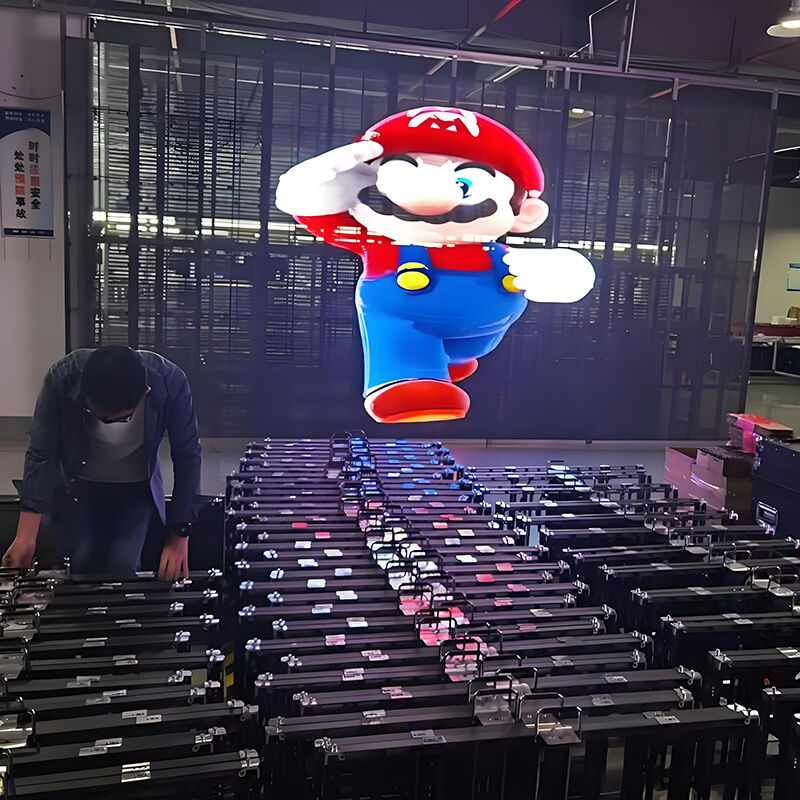
Regular LED screens typically feature tightly packed LED modules attached to solid printed circuit boards, which gives them that super bright output of around 5,000 to 10,000 nits needed for those massive outdoor ads and stadium jumbotrons. Transparent LED technology works differently though. These displays use surface mount devices stuck onto glass panels or fine wire grids instead. What this does is let about half to three quarters of light pass through while still keeping everything structurally sound. The result? Digital content can appear right alongside whatever's behind the screen. Retail stores love putting these in shop windows where customers can see products and promotions at the same time. Museums also find them useful for building facades where they want to showcase art without blocking views of the architecture itself. Standard displays remain king when ambient light levels are high, but transparent versions offer something special by blending digital messages into physical spaces rather than just sitting there like traditional screens do.
| Feature | Standard LED Display | Transparent LED Display |
|---|---|---|
| Structure | Opaque PCB backplate | Glass/mesh substrate |
| Brightness | 5,000–10,000 nits | 3,500–6,000 nits |
| Transparency | 0% | 50–80% |
| Best For | Stadiums, outdoor ads | Storefronts, exhibits |
Essential Technical Metrics: Brightness, Pixel Pitch, Refresh Rate, and Viewing Angle
Four interdependent metrics define real-world LED display performance:
- Brightness (nits): Indoor applications typically require 800–1,500 nits; outdoor or sunlit installations demand ≥5,000 nits to prevent washout.
- Pixel Pitch (mm): Lower values (e.g., P1.2–P2.5) support high-resolution viewing at close range—critical for control rooms or retail kiosks—while higher pitches (P6–P10) suit large-scale, distant-audience deployments like stadium scoreboards.
- Refresh Rate (Hz): ≥3,840Hz is essential for broadcast-grade video capture, eliminating visible flicker under camera exposure.
- Viewing Angle: ≥160° horizontal and vertical angles ensure consistent color and luminance across wide audience zones—vital for command centers and live-event staging.
These parameters collectively determine suitability—not just for environment, but for human interaction. For instance, rental displays balance portability with performance: lightweight modular designs often target 1920–3840Hz refresh rates and pixel pitches between P2.5 and P3.9 to serve both close-up presentations and mid-field visibility.
How to Choose an LED Display Based on Application Requirements
Retail & Architectural Installations: Prioritizing Transparency, Aesthetics, and Daylight Readability
When it comes to storefronts, museums, and those fancy building facades we see nowadays, looks really do matter more than just throwing specs at the wall. Transparent LED displays work wonders here because they let natural light pass through and keep sightlines clear, which is super important when the glass is over 70% transparent. The slim design matters too, usually less than 25mm thick, and mounting them without frames helps maintain what architects originally had in mind for the space. Getting good visibility outside during sunny days requires displays brighter than 5,000 nits though, otherwise nobody will read what's shown. For people shopping nearby, pixel sizes between P2.5 and P5 create sharp images that look great from about 3 to 5 meters away. And don't forget about durability factors either. Displays need at least IP54 protection against dust plus special coatings that resist UV damage if they're going to last long term in busy public areas where maintenance isn't always convenient.
Event, Rental, and Indoor Control Rooms: Emphasizing Portability, Fast Setup, and Image Fidelity
For events, TV production spaces, and those high-stakes control environments where every second counts, fast setup without sacrificing quality is non-negotiable. Rental display systems are designed with quick assembly in mind thanks to their modular components that snap together without tools. Most setups can be completed within just over an hour and a half, plus they're lightweight at around 15 kilograms per square meter which makes them much safer when hanging from overhead structures. These screens deliver rock solid performance too, with refresh rates hitting 3,840 Hz or better and viewing angles stretching out to at least 160 degrees so there's no annoying flicker visible either on camera or for large crowds watching live. When it comes to image quality, manufacturers aim for contrast ratios above 5,000 to 1 and maintain tight color calibration with Delta E values below 3. This ensures text remains readable even in bright control room conditions while preserving all those subtle shades needed for dramatic lighting effects onstage. Plus, with tough protective cases, replaceable power/data connectors, and engineers standing by onsite, operators face far fewer headaches when running extended events lasting several days straight.
Transparent LED Display Selection: Resolving the Transparency–Performance Trade-Off
Modular, Film-Based, and Hollow PCB Designs Compared for Clarity, Weight, and Serviceability
Transparent LED displays resolve the tension between visibility and performance through three distinct architectures:
- Modular designs use interlocking aluminum-framed panels with conventional LED placement—delivering high brightness (≥5,000 nits) and fine pixel pitches (P2.5–P3.9) ideal for dynamic, frequently updated content. Their trade-off is weight (up to 25 kg/m²) and limited transparency (40–60%).
- Film-based solutions embed micro-LEDs directly onto tempered glass via adhesive lamination, achieving 70–85% transparency and ultra-low weight (<12 kg/m²). Though aesthetically seamless for architectural integration, they're more susceptible to ambient light distortion and lack field-replaceable components.
- Hollow PCB configurations mount LEDs along sparse open-frame strips, balancing 50–70% transparency with moderate brightness (1,200–2,500 nits). Their parallel strip layout enables component-level servicing—no full panel replacement needed—making them especially suited for rental fleets requiring rapid maintenance.
For retail windows where unobstructed views are paramount, film-based systems lead. For control rooms or broadcast environments demanding calibration stability and long-term reliability, modular or hollow PCB options offer superior serviceability and luminance consistency.
How to Choose an LED Display Manufacturer: Quality Assurance, Support, and Scalable Customization
When choosing a manufacturer, there are really three things that matter most: solid quality control, good tech support when problems arise, and the ability to scale custom solutions. Look for companies that actually make products on site with ISO 9001 certification. Experience shows these tend to have fewer failures in the field and produce components that match specs consistently. Check what kind of warranty comes with the purchase too. A decent warranty should cover at least three years, include labor costs, and ensure replacement parts will be available for about five years after installation. For complicated installations, ask about their capability to handle unusual sizes, odd shapes, or equipment that can be maintained without major disassembly. These features save time during setup and prevent headaches later. Top manufacturers usually assign engineers to big projects and offer clear cost models that factor in power usage, cooling needs, and what maintenance will look like over time. And don't just take their word for it. Ask for actual examples from similar projects they've completed in environments comparable to yours.
Frequently Asked Questions
What is the main difference between standard and transparent LED displays?
Standard LED displays use opaque PCB backplates, providing high brightness and are ideal for outdoor ads and stadiums. Transparent LED displays allow light to pass through, making them suitable for storefronts and exhibits due to their blend with physical spaces.
Why is pixel pitch important in LED displays?
Pixel pitch determines the resolution and viewing distance of the display. Lower values are better for close-range viewing, while higher pitches are suited for larger and distant audiences.
What factors should be considered when choosing an LED display manufacturer?
Consider quality assurance, tech support, scalable customization options, and warranty period when choosing a manufacturer.
Table of Contents
- Understanding LED Display Fundamentals: Types, Core Metrics, and Use-Case Alignment
- How to Choose an LED Display Based on Application Requirements
- Transparent LED Display Selection: Resolving the Transparency–Performance Trade-Off
- How to Choose an LED Display Manufacturer: Quality Assurance, Support, and Scalable Customization
- Frequently Asked Questions